One scheduling process across your Ontario secondary schools.
When each school builds its schedule its own way, every school solves the same problems separately. Meridian60 gives participating schools the same structured workflow, so the process is consistent from one school to the next.
See Meridian60 for school boards.
Length:
Best on a computer. The demo uses invented data, and nothing is saved.
Read the transcript
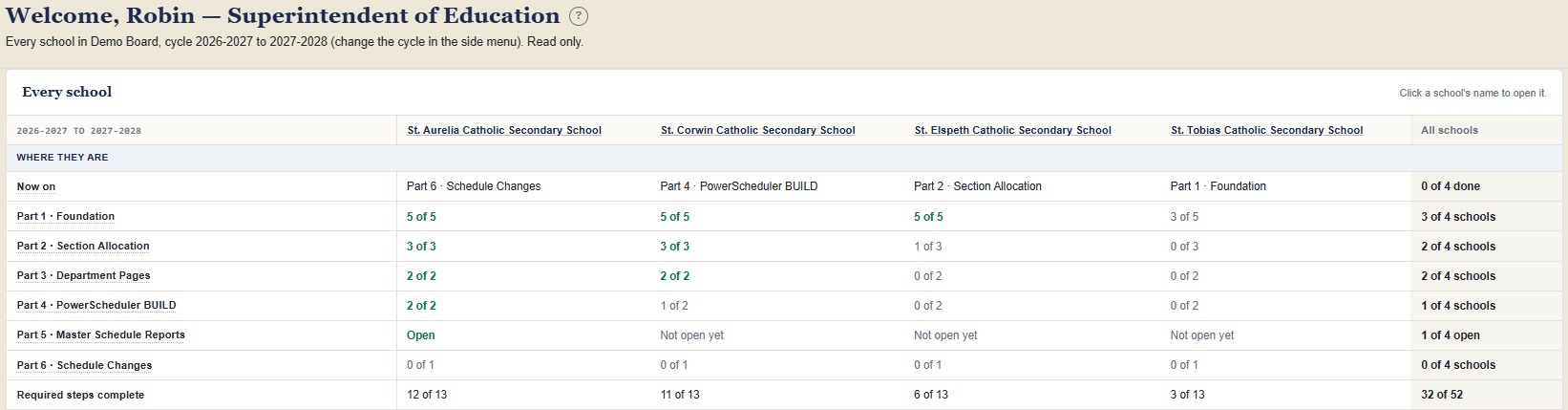
Every school, one clearer picture. Where does each school stand in the scheduling process? Meridian60 gives Ontario school board leaders a clear view of progress across schools side by side. See which stages are complete and where support may be needed. Once timetables are imported, review scheduling concerns including overcapacity classes and room conflicts. Open a school to review completed steps, who marked them complete, and when. The board view is read-only, so schools remain in control.
Meridian60. The scheduling season, shortened.
Explore the board member demo at demo.meridian60.ca.
-
Consistency across schools.
Participating schools follow the same steps, with the same tools and timelines, so results are easier to compare, and training and support are simpler.
-
Time back for your schools.
Less repetitive work, fewer spreadsheets and less back-and-forth mean the people building schedules spend their time on decisions, not data entry.
-
Works alongside what you have.
Meridian60 organizes and manages the scheduling process. Your existing scheduling software still builds the timetable, and Meridian60 doesn’t replace your student information system.
Every school, side by side.
A superintendent or board scheduling lead can have their own Board Member login: view only, and only for your board’s schools.
- The Board Overview. Every school side by side: how far along each one is in the scheduling steps, with its key numbers, such as total requests, planned sections and sections built, and flags like classes over their maximum and rooms double-booked.
- Open any school, read only. Each school’s progress, course requests, section counts and master schedule reports.
- Enforced by the database. A Board Member can’t change anything and sees only your board’s schools. The database itself refuses anything else; it doesn’t rely on the app hiding things.
- Signs in like a Principal. With a username and password. Meridian60 creates and manages Board Member logins, as it does the Principal, Guidance Head and Special Guest logins at each school, so your board doesn’t need an administrator account of its own.
- Staff survey answers and Department Heads’ work stay with the school.
 (opens full size)
See it in the demo
The Demo School includes a Board Member view of four invented schools. The button below opens the demo as a Board Member, on the Board Overview. For a guided tour, try the last step in “Things to try”: See your board at a glance.
Best on a computer. The demo uses invented data, and nothing is saved.
Built with school board security and privacy in mind.
-
No student personal information.
Meridian60 uses course information and request totals, not student records.
-
School data stays in Canada.
The database and sign-in services run only in Canada Central; school data never passes through our web host.
-
Access by role.
The database itself decides what each person can see and change.
-
Each board’s data is kept separate.
Every piece of data carries its board, and accounts can only reach their own board’s.
Start small.
Start with a few schools and grow from there.
See how it would work across your schools.
Try the Demo School, including the Board Member view, or book a 30-minute walkthrough built around how your schools schedule today.
Best on a computer. The demo uses invented data, and nothing is saved.